Goals
A goal is something you're saving toward, like an emergency fund, a car, or a vacation. You pick an amount and a date, and Bigger Piggy shows how much to set aside each month and whether you're on pace.
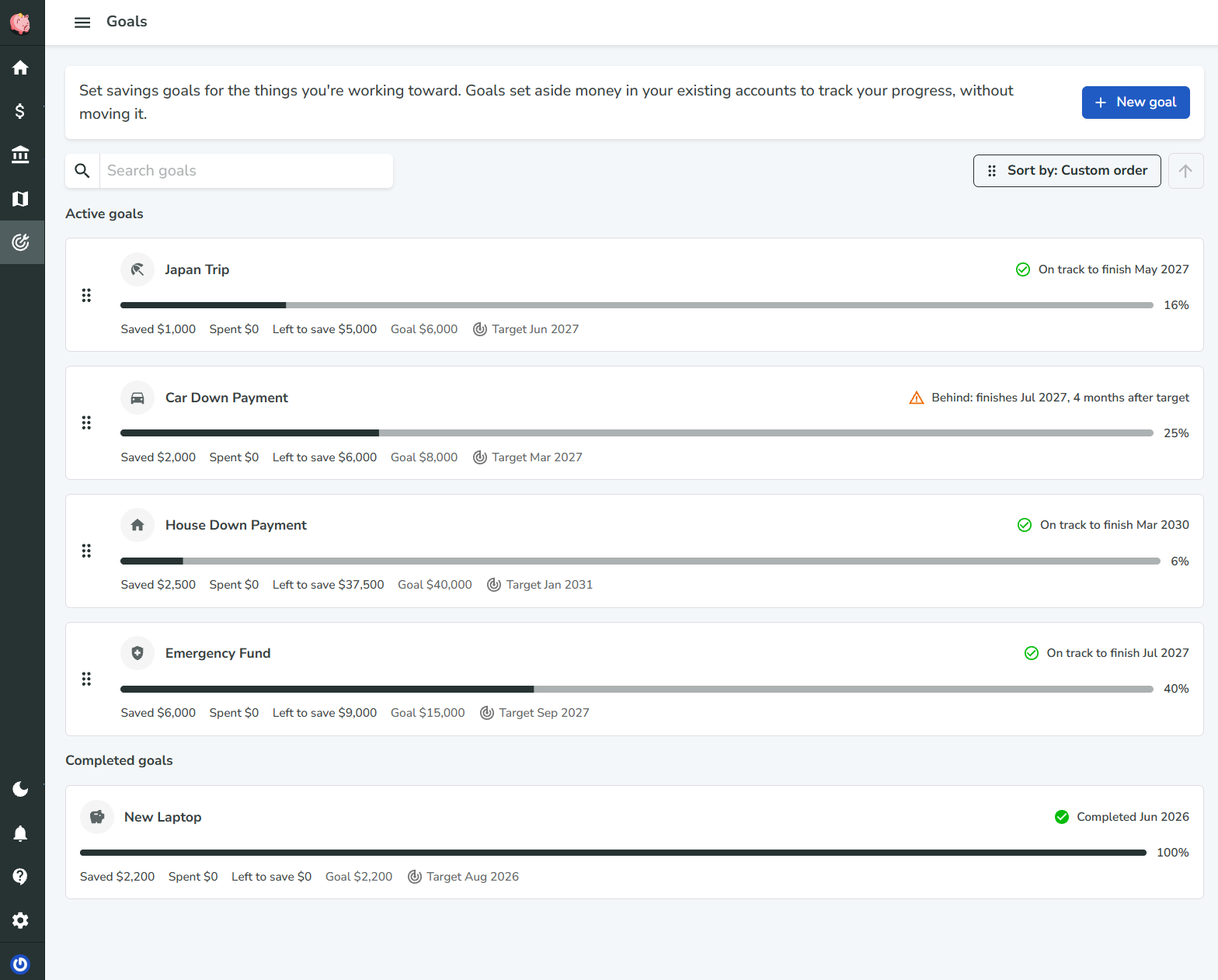
How goals work
Each goal tracks money you've set aside in your checking and savings accounts. Only open depository accounts can fund a goal.
For each goal, the page shows:
- Saved is the money you've set aside, minus anything you've withdrawn.
- Left to save is the goal amount minus what you've saved.
- Goal is the amount you're aiming for.
- Target is the month you want to be done by, if you set one.
An account's balance can only be set aside once. If your checking account holds $1,000 and your goals already reserve $900 of it, you can set aside at most $100 more from that account. When you pick an account, it shows the balance left after goals.
The Goals page
Open Goals in the main navigation. The header has a New goal button and a search field. Below it, each goal is a row in the Active goals list, followed by Completed goals. A row shows the goal's progress bar, the amounts above, and a status line:
- On track for Oct 2027 means you'll finish by your target month, or you haven't set one.
- Behind schedule, on pace for Oct 2027 means your current monthly contribution finishes after your target month.
- Completed means you've saved the full amount.
Click a row to open its details.
Searching
Type in Search goals to filter both lists by goal name. The search ignores capitalization and extra spaces. Your search stays in place when you open a goal and come back. Clear the field to see every goal again.
Sorting and reordering
Use the Sort by menu to order your goals by:
| Option | Orders by |
|---|---|
| Custom order | The order you set by dragging |
| Name | Goal name |
| Saved | Amount saved |
| Spent | Amount spent |
| Goal amount | The goal amount |
| Left to save | Amount still to save |
| Progress | Percent complete |
| Target date | Target month. Goals without one always come last. |
| Created | When you created the goal |
The arrow next to the menu switches between ascending and descending. It's turned off for Custom order.
With Custom order, each active goal has a drag handle. Drag a goal to a new position, or focus its handle and press Space, use the arrow keys to move it, and press Space again to drop it. Handles are turned off while you're searching, because a filtered list isn't your full order. Clear the search to reorder.
New goals appear at the top of a custom order. Completed goals can't be dragged. They stay in order of when you completed them.
Your sort choice and custom order are saved to your account, so they follow you to other devices.
Creating a goal
Click New goal and fill in the form:
| Field | What it does |
|---|---|
| Goal type | Emergency Fund, Car, Vacation, Home, Wedding, or Custom. Choosing a type fills in the name if you haven't typed one. |
| Goal name | Must be unique among your goals. |
| Goal amount | How much you want to save. |
| Money you've already saved | Optional. Pick one or more accounts and the amount in each that you're setting aside now. |
| Target date | Choose Set and pick a month, or Don't set if there's no deadline. |
| Monthly contribution | How much you plan to save each month. |
| Start month | When the goal begins. Defaults to this month. |
Until you change it yourself, the monthly contribution follows a suggestion: the amount needed to reach your goal by the target date, after counting what you've already saved. It updates as you change the goal amount, saved money, or dates.
Once you've entered an amount, the form shows your plan status:
- You're on track to finish on time
- You'll finish early or You'll finish late, with one-click buttons to adjust your contribution or target date so the plan fits.
- You'll reach your goal by Oct 2027, when there's no target date.
Goal details
Click a goal to open its details drawer. You can edit the goal's type, name, amount, monthly contribution, target date, and start month right there, then click Save. You can't lower the goal amount below what you've already saved.
The drawer also shows:
- Set aside by account lists each account holding money for this goal. An account shows Underfunded by $X if its balance has dropped below the total its goals reserve.
- Activity lists every change, newest first: the starting amount, contributions, and withdrawals.
Contributing and withdrawing
Goals don't track your real transfers. Instead, you tell Bigger Piggy when you set money aside or release it.
- Contribute sets aside more money. Choose the account, amount, and date. The amount can't be more than the account has available after your other goals.
- Withdraw releases money back to an account. You can only withdraw to an account that has money set aside for this goal, and no more than it has set aside.
The date has to be between the goal's start month and today.
Completing and deleting goals
A goal completes automatically when your saved amount reaches the goal amount, and it moves to Completed goals. Completed goals keep their activity and keep the money set aside. If you later withdraw enough to fall below the goal amount, the goal becomes active again.
Delete Goal removes the goal and its activity, and releases the money it had set aside. Your accounts and transactions aren't affected. Deleting an account also removes any money that goals had set aside in it.
Goals on dashboards
Goal data is available to dashboard widgets, so you can chart progress toward your goals alongside the rest of your finances. For example, a progress widget can compare saved to target for each goal. See
Widget types.